With the Windows 10 Creators Update rolling out on April 11th (see our blog post here about it) we thought we should share some Tech Tips all around one of our favorite Windows 10 features… Cortana.
It is hard to think of Cortana as simply a feature of Windows 10.
Cortana is your truly personal digital assistant!
She is designed to help you get things done, remind you of things, provide answers, take notes and complete basic tasks.
Check out this video to see a few things Cortana can do for you:
Getting started is as easy as 1-2-3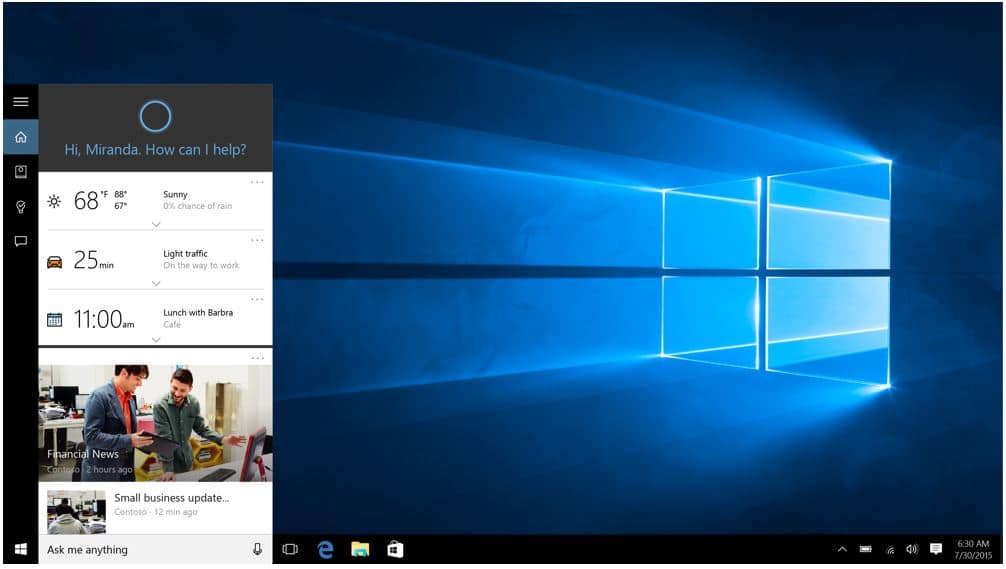
- On your Windows 10 PC you can launch Cortana by tapping the Cortana Circle on the bottom left of your screen.
- If you are not logged in to your Microsoft account you should do so.
- Start typing a question or a document name that you are looking for.
Use Cortana Anywhere on Any Device
Cortana is available for iOS and Android devices too. To install Cortana, go to iTunes or the Google App Store.
Getting Smarter All the Time
The more you use Cortana ,the more Cortana learns about your preferences and can help you. Be on the lookout next week when we show you how to use Cortana Reminders.
Windows 10 Creators Update – Coming April 11th, 2017
On April 11, the Windows 10 Creators Update will begin to roll out to customers around the world as a free update. Click here for more details on the new features!
Was this Tech Tip helpful? Please let us know by filling out our tiny survey!